-
Prepare by Xtremepapers!
🚀 NEW from the xtremepape.rs team: AI exam prep — 150,000+ worked solutions, and it marks your handwritten working from a photo. Sign in with your forum account & try it free → prepare.xtremepape.rs
You are using an out of date browser. It may not display this or other websites correctly.
You should upgrade or use an alternative browser.
You should upgrade or use an alternative browser.
Computers & ICT: Post your doubts here!
- Thread starter XPFMember
- Start date

- Messages
- 124
- Reaction score
- 49
- Points
- 38
Hey man so far i know you need to go through the webpage and read through the sections given and then write 1 of 2 points on the given topicsi have problem in this question too ....let me knw if you find ne solution to q 16 in m/j 2011
- Messages
- 124
- Reaction score
- 49
- Points
- 38
I believe u talking about of june 2011 aswellhow do we change Y and N to yes no format ?
 You need to change format of Avail_1 and other Avails into Yes/No format while your in "Import Text Wizard" from the option "Advanced".. it will comes us -1 or 0 which means ur going right.
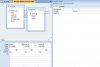
And then while making the query, Click on the properties of field Avail_1, from General, click on Format and make it Yes/No. On next to General is Lookup click there, make the Display Control to "Text Box". make it same for others
Screenshot of where u find the General and Lookup.
Attachments
thnks man! but in which format do you import ?when i choose to import in yes/no in import text wizard there is error...I believe u talking about of june 2011 aswell
And then while making the query, Click on the properties of field Avail_1, from General, click on Format and make it Yes/No. On next to General is Lookup click there, make the Display Control to "Text Box". make it same for others
Screenshot of where u find the General and Lookup.
did u do the activity in book?
did u finish yours...if you did can you give it to me by email or nething at all ?Hey man so far i know you need to go through the webpage and read through the sections given and then write 1 of 2 points on the given topics
- Messages
- 124
- Reaction score
- 49
- Points
- 38
Reallly? :-O cause im not getting any errorsthnks man! but in which format do you import ?when i choose to import in yes/no in import text wizard there is error...
did u do the activity in book?
Anyway tell me the steps how u do it then i think i can help you!

- Messages
- 414
- Reaction score
- 3,809
- Points
- 523
any 1 has source file for 2009 mayjune ppr 2 ict ?
i use microsoft access 2007 and i convert my csv to workbook and then import it with import excel file option in access and during import.i change it to use yes/no data typeReallly? :-O cause im not getting any errors
Anyway tell me the steps how u do it then i think i can help you!
it does not show in 0 or -1 format but it just shows Y and N format i thinkt here is the problem.but i dont how to change the Y and Ni use microsoft access 2007 and i convert my csv to workbook and then import it with import excel file option in access and during import.i change it to use yes/no data type
- Messages
- 124
- Reaction score
- 49
- Points
- 38
Instead of doing all that, you can click import and from the drop down choose "text file" and then try doing it again !!it does not show in 0 or -1 format but it just shows Y and N format i thinkt here is the problem.but i dont how to change the Y and N
- Messages
- 124
- Reaction score
- 49
- Points
- 38
You mean AS Applied ICT?then yeahany 1 has source file for 2009 mayjune ppr 2 ict ?
Attachments
- Messages
- 414
- Reaction score
- 3,809
- Points
- 523
tYou mean AS Applied ICT?then yeah
thnxYou mean AS Applied ICT?then yeah
ok butInstead of doing all that, you can click import and from the drop down choose "text file" and then try doing it again !!
do you import csv by converting csv into workbook or textfile ?

- Messages
- 8
- Reaction score
- 4
- Points
- 3
csv files are actually text files, so they are imported as a textfile.
You don't need to convert them.
You don't need to convert them.

- Messages
- 350
- Reaction score
- 64
- Points
- 38
how do we change Y and N to yes no format ?
I believe u talking about of june 2011 aswell
And then while making the query, Click on the properties of field Avail_1, from General, click on Format and make it Yes/No. On next to General is Lookup click there, make the Display Control to "Text Box". make it same for others
Screenshot of where u find the General and Lookup.
well you can make Yes/No appear in the tables through this way.
Do the step shown in the picture when import the files in access:
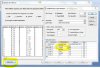
and then select as shown:
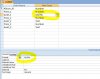
- Messages
- 350
- Reaction score
- 64
- Points
- 38
upload one of your file(zip the file first and then upload).. make sure there's no virus in it... a virus caused me fare bit of trouble recentlywhenever i close my excel all the formulas goes away its not there anymore....wht should i do so that they do not vanish ?

- Messages
- 375
- Reaction score
- 205
- Points
- 53
Anyone resource files for AS-level May/June 2011 ?
- Messages
- 8
- Reaction score
- 4
- Points
- 3
The files that are given to you are .csv files, and they save values only (hence the name, comma separated VALUES)
It's always recommended to you save your file as excel workbook (Save as --> excel workbook).
It's always recommended to you save your file as excel workbook (Save as --> excel workbook).